Codium Logo Codium Logo
  • Services
    • Strategy
      • Technology Partner
      • UI / UX Design
      AI
      • AI Consulting
      • AI Reporting
    • Development
      • Software Development
      • Mobile App Development
      • Software Integration
      • Hardware Integration
      • Microsoft Access Databases
      • Replace Spreadsheets
    • Managed services
      • Software Takeover
      • Software Support (SLA)
      • Managed Hosting
      • Private AI Hosting
      • On-Premise AI
  • Industries
  • Our Work
  • About
  • Blog
Microsoft Access Databases · Adelaide

Your Access database got you this far. Let's get it onto the web.

Access has run countless businesses since the 1990s, and plenty still depend on one today. We've built and supported Access databases for years, so we know exactly how to move yours into a secure, web-based application your team can use from anywhere, without losing a record or a rule along the way.

Plan a migration See how migration works
AInventory.accdb– □ ×
tblOrdersfrmOrderrptMonthly
IDCustomerDueStatus
1041Norwood Hardware14/10Open
1042Hills Fencing15/10Open
1043Port Adelaide Marine15/10Invoiced
1044Barossa Timber18/10Open
Record 2 of 12,480Exclusive lock
app.yourbusiness.com.au
Orders14 online
Records migrated12480
Open orders38
Synced to Xero100%
▶
#1042 · Hills FencingEdited on site from a phone · 2 min ago
Open
✓
#1043 · Port Adelaide MarineInvoice pushed to Xero automatically
Invoiced
Orders this week
Backups
Nightly · verified
Point-in-time
Restore tested
✓12,480 records migrated, 0 errors
↻No more “file in use” lockouts
  • Years of Access and VBAWe've built and supported Access databases since well before the cloud. We read VBA fluently.
  • Migration specialistsSince 2016 we've focused on moving businesses off Access, not building new ones.
  • Xero integration partnerOne of Australia's leading Xero integrators, so your new system talks to your accounts.
  • 100% Australian teamAnalysts, designers and developers, all in-house in Adelaide under ISO 9001 processes.
Why move off Access?

Access gave you a low-cost system on the office network. Your competitors are now on the web.

Access let business owners build useful systems cheaply, running on local computers. Technology has moved on: fast internet and web-based systems mean your database can be used from anywhere, on any device, by as many people as you like. Meanwhile, good Access developers are getting harder to find every year.

Running the business on…

  • ×Only works on the office network, on a PC with Access installed

    ✓Works anywhere, on any device, including staff phones in the field

  • ×One corrupted .accdb file away from losing everything

    ✓Hosted SQL database with automatic backups and point-in-time recovery

  • דFile in use” errors whenever two people need it at once

    ✓Unlimited users working at the same time, with proper permissions

  • ×Reports exported, tidied in Excel and emailed around by hand

    ✓Live dashboards, customer portals and automatic sync to Xero

Access from anywhere

Desk, warehouse, site or home. Staff use the system on whatever device is in front of them, with nothing to install.

Real multi-user

No locks, no corruption, no “close it so I can get in”. Everyone sees the same live data with the right permissions.

Connected to everything

Once your data is on the web, APIs link it to Xero, your website, calendars and payment gateways automatically.

Secure and backed up

Hosted on AWS with encryption, user-level security and backups you never have to remember to run.

Two ways to get there

Rebuild in one go, or transition gradually. Your situation decides.

Depending on how much you rely on the database day to day, we'll recommend one of two paths. Both end in the same place: a modern web application built around how you actually work.

Path A

Complete web rebuild

We use your existing database as the blueprint: every table, form, query, report and VBA rule tells us how your business works. Then we design and build a web application that does all of it better, migrate your data across, and cut over when you're ready.

Best when the Access system is showing its age and you'd rather replace it than extend it.

Path B

Gradual transition

We move your data out of the Access file into a hosted SQL database, so your existing Access front end keeps working. Then we build new modules on the web, one at a time, with both systems sharing the same live data until Access is no longer needed.

Best when the business can't pause, or you want to spread the investment over time.

01

SQL migration

Running from a single data file? We migrate the data to Microsoft SQL Server so Access keeps operating while the web application is built.

02

VBA understood

Access runs on Visual Basic for Applications behind the scenes. Our team reads it, so the logic buried in your database carries over to the new system intact.

03

Access support meanwhile

We keep your Access database running while the migration is planned. This support is available to clients who complete a Discovery phase for their new web-based solution.

Our support services
04

Xero and API integration

Once migrated, we link your new system to accounting and other software through APIs, so HR, operational, procurement and payment data moves to and from Xero automatically.

Software integration

Not sure which path fits?

Send us a description of what your Access database does and roughly how many people use it. We'll tell you honestly which approach we'd take, and what it would involve.

Ask about your database
Case study · Term Deposit Shop

From an Access prototype to an online investment platform

Term Deposit Shop first engaged us to speed up their internal processes with a rapid prototype built in Microsoft Access and VBA. It worked so well that in 2015 we began building their cloud-based cash management platform on top of it.

Today the Access front end and the web portals for clients and advisers share one securely hosted SQL database, so every transaction between the two is instant and accurate. Staff kept the tools they knew, customers gained online access, and the platform even fills out the banks' paper forms as ready-to-sign PDFs.

Read the full story
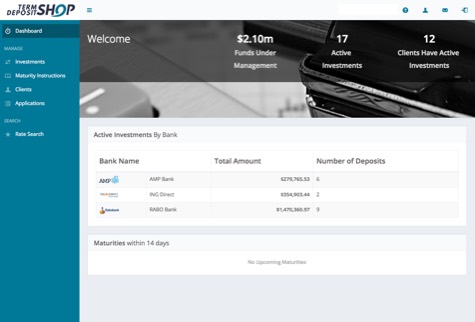

Term Deposit Shop client portal dashboard Adelaide, SA
How migration works

Nothing gets lost, and nobody stops working

Migrations go wrong when the new system is built from a wish list instead of the database that actually runs the business. Ours starts inside your Access file.

01

Discovery

First, we get inside your database and your business to understand what it really does.

We audit the tables, relationships, queries, forms, reports and VBA, and run workshops with the people who use it every day. Together we work out what to keep, what to improve and what to drop, and whether a complete rebuild or a gradual transition suits you. You finish with our detailed findings and a recommended path.

Typically 2–4 weeks 30%of the journey
Discovery workshop at the whiteboard
02

Prototype

Next, our designers turn the findings into a clickable prototype of the new web application.

Every screen your team will use, redesigned for the web rather than copied from Access forms. Alongside it we map every field in your database to its new home and write a detailed requirements document, so you can see exactly what you're getting before a line of code is written.

Typically 4–6 weeks 60%of the journey
High-fidelity prototype of the new application
03

Migrate and deliver

Then we build the application, move your data across and switch over without disrupting the business.

Data is migrated into a hosted SQL database and validated against the original, record by record. You're invited to regular review meetings as the system takes shape, and we run the old and new side by side until you're confident. Then Access is retired, or kept around for as long as you want it.

Typically 2–3 months 100%live on the web
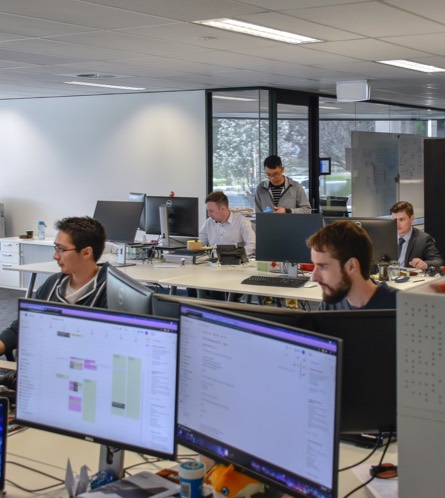
Codium's Adelaide developers at work
∞

And after the switch?

The same team hosts your new system on AWS, supports it under an SLA and keeps adding the features Access never could.

Managed hosting Software support
From our Access developers

Guides for looking after the database you have today

Until you migrate, your Access database still has to be secured, backed up and understood. These articles come from years of doing exactly that.

Microsoft Access basics

Tables, queries, forms and reports: how the pieces of an Access database fit together.

Read the guide

Relationships in Microsoft Access

Why relationships matter, and how they map to a modern relational database.

Read the guide

Macros in Microsoft Access

What macros can do, where they hit their limits, and when VBA takes over.

Read the guide

Microsoft Access and reports

Getting useful reports out of Access, and what live dashboards do differently.

Read the guide

Microsoft Access source control

How we keep Access and VBA under version control on client projects.

Read the guide

Microsoft Access database security

The realistic security limits of a file-based database, and how to reduce the risk.

Read the guide

Microsoft Access database backups

Backing up an .accdb properly, and why a hosted database makes it automatic.

Read the guide

More on the blog

Software, integration and hosting articles from the whole team.

Browse all articles
Good questions

Things people ask before they leave Access

Can't see yours? Ask us directly.

Do you still build new Microsoft Access databases?

No. In 2016 we made the decision to stop creating new applications in Access. Our vision is to see every business using the right tools to reach its potential, and we'd be doing you a disservice building something your competitors have already moved past. We do support existing Access databases for clients who are planning a migration with us.

Will we lose data or history in the move?

No. Your data is migrated into a hosted SQL database and validated against the original, record by record, before you switch. Historical records, relationships and the business rules in your VBA all carry across. Where the old data has inconsistencies, we find them during Discovery rather than discovering them live.

Can we keep using Access while the new system is built?

Yes. If you're running from a single data file we can migrate the data to Microsoft SQL Server first, so your existing Access front end keeps working on the new database while the web application is built around it. That's the gradual transition path, and it's how Term Deposit Shop ran for years.

What happens to all the logic in our VBA code?

We read it. Access runs on Visual Basic for Applications behind the scenes, and our team understands it, which is the advantage of using a developer with real Access experience for your migration. The calculations, validations and workflows in your VBA are documented during Discovery and rebuilt properly in the new system.

How long does a migration take?

It depends on the size of the database and the path you choose, but as a guide: Discovery usually takes 2–4 weeks, Prototype 4–6 weeks, and Migrate and deliver 2–3 months. A gradual transition spreads the build over a longer period, one module at a time.

Can the new system talk to Xero and our other software?

Yes, and it's one of the biggest wins of leaving Access. We're one of Australia's leading Xero integration providers, and once your data is on the web we connect it to accounting, calendars, payment gateways and other systems through APIs. See our software integration service.

Where will the new system live, and who looks after it?

We do. Your application and its database are hosted on AWS under our managed hosting, with automatic backups, monitoring and security patching. Ongoing bug fixes, improvements and advice are covered by a support SLA.

Still running the business on an .accdb file?

Tell us what your Access database does and who uses it. One of our digital strategists will talk through your options.

Book a Discovery call Call 1300 887 103

Not sure where to start? Discovery is a standalone, fixed-price phase: two to four weeks working through your workflows and settling the scope, timeline and cost. You keep everything we produce and there's no obligation to build with us. If off-the-shelf software is the better answer, we'll say so.

Codium Logo
Codium Pty Ltd.
Ground Floor, 207 Greenhill Road
Eastwood, 5063
Adelaide, South Australia
  • 1300 887 103
  • sales@codium.com.au

Development

  • Software Development
  • Mobile Apps
  • Software Integration
  • Hardware Integration
  • Microsoft Access
  • Replace Spreadsheets

Managed Services

  • Software Takeover
  • Software Support (SLA)
  • Managed Hosting
  • Private AI Hosting
  • On-Premise AI

AI

  • AI Consulting
  • AI Reporting

Strategy

  • Technology Partner
  • UI / UX Design
  • Due Diligence (M&A)
  • Why Projects Succeed
  • What Software Costs
  • What AI Consulting Costs

Technologies

  • PHP · Laravel
  • JavaScript · Vue.js
  • AWS

Company

  • About Us
  • Industries
  • Our Work
  • Blog
  • Careers
  • Contact Us
  • Customer Feedback
  • Remote Support

© Codium Pty Ltd. All Rights Reserved.

  • Terms of Business
  • Privacy Policy
  • Quality Policy
  • Security Policy
  • Customer Experience Charter
Back Top
Codium
Services
All services Strategy
  • Technology Partner
  • UI / UX Design
  • Technology Due Diligence
  • Why Projects Succeed
  • What Software Costs
  • What AI Consulting Costs
Development
  • Software Development
  • Mobile App Development
  • Software Integration
  • Hardware Integration
  • Microsoft Access Databases
  • Replace Spreadsheets
Managed services
  • Software Takeover
  • Software Support (SLA)
  • Managed Hosting
  • Private AI Hosting
  • On-Premise AI
AI
  • AI Consulting
  • AI Reporting
Industries
All industries
  • Construction
  • Finance
  • Government
  • Health
  • Insurance
  • Manufacturing
  • Mining
  • Retail & E-commerce
  • Transport & Logistics
Our Work About Blog
Get in touch Call 1300 887 103