Codium Logo Codium Logo
  • Services
  • Industries
  • Our Work
  • About
  • Blog
Our work · Case study

Big Screen Video

Big Screen Video designs and installs large-scale digital displays and LED technology for hospitality, retail, sport, education, transit and gaming venues, with offices in four states and projects across Australia, New Zealand and Southeast Asia. Codium built the platform that watches every one of those screens: what it's showing, how bright it is, how much power it's drawing and whether it has a fault, with a portal for the media owners who advertise on them.

Cloud applicationIoT monitoringDigital signageClient portal
Visit bigscreenvideo.com.au
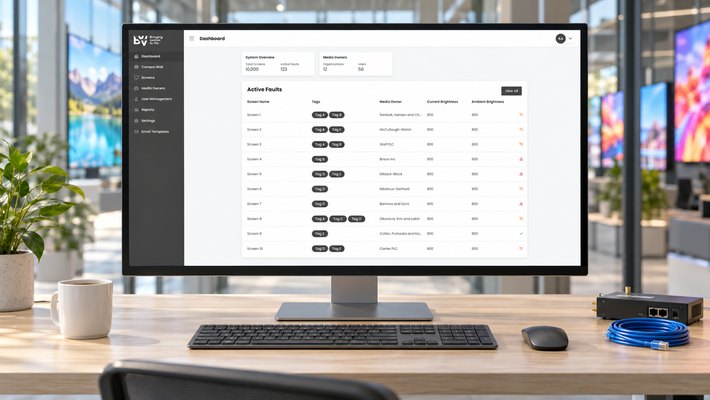
Big Screen Video monitoring dashboard on a monitor in the operations office
  • ClientBig Screen Video
  • IndustryDigital signage and AV
  • The workA cloud monitoring platform for a national fleet of LED screens, with a media owner portal.
  • UsersBig Screen Video's operations team and the media owners who run content on the screens.
The brief

One place to see every screen, from a camera wall to a power bill

A large-format LED screen is an expensive asset running in public, often unattended. Big Screen Video needed to know, across thousands of screens and dozens of media owners, which ones were online, what each was displaying, whether brightness matched ambient light, how much power each drew and when faults started and ended. The platform captures all of it from the screens themselves and puts it on one dashboard, with the history to back up service calls and reporting.

01

Fleet dashboard

Total screens, active faults, media owners and users at a glance, with the live fault list showing current and ambient brightness for every affected screen.

02

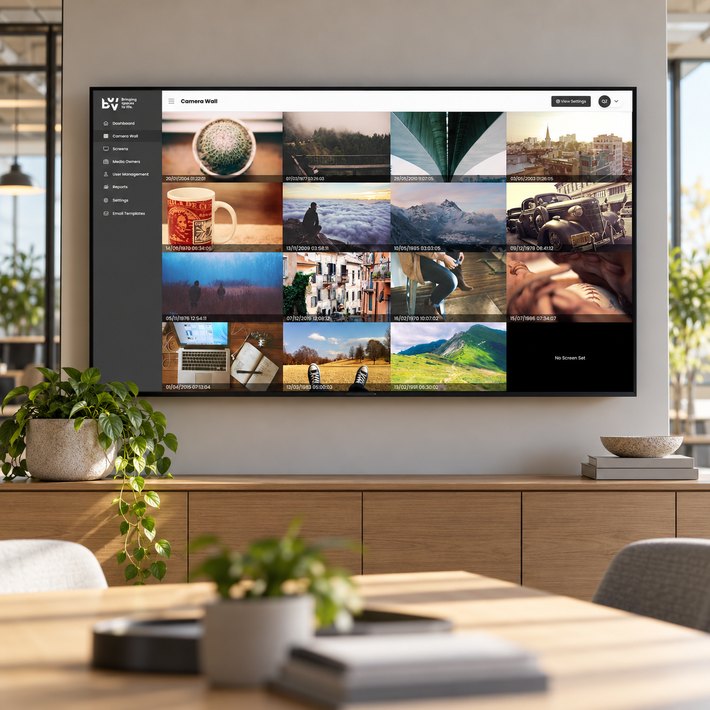
Camera wall

A live wall of camera images from the screens themselves, each timestamped, so the team can see what's actually on the glass without leaving the office.

03

Brightness and power logging

Current and ambient brightness logged over time, with hourly power consumption in amps and kilowatt hours per screen.

04

Fault and offline history

Every fault and offline period recorded with start, end, duration and the percentage of the screen affected.

05

Media owner portal

Media owners log in to their own portal to see their screens, status and reports, with two-factor authentication and tag-based access.

06

Reporting and integrations

Screen status reports on green time by date range, media owner and tag, plus API, FTP and data transfer integrations configured from settings.

Big Screen Video camera wall on a TV mounted on an office wall
Camera wall

See what every screen is showing, right now

Each screen reports a camera image on a schedule. The camera wall tiles them with their timestamps so operators can scan the whole fleet in seconds, spot a blank or stuck screen, and click through to its history.

  • Live tiled view across all screens with the capture time on each
  • Image history per screen to see what was showing at any point
  • Filter by media owner and screen tags
  • Camera settings managed per screen
Power and brightness

Hourly power consumption and brightness, per screen

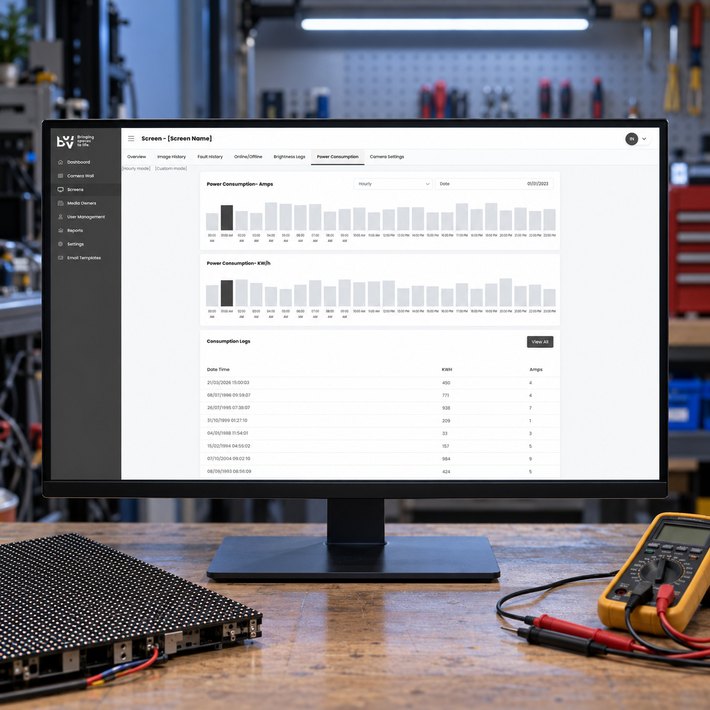
Every screen logs its brightness against ambient light and its power draw. Hourly and custom-range views make it easy to see a screen running too bright for the conditions, or drawing more power than it should.

  • Power consumption in amps and kWh, hourly or over a custom range
  • Brightness logs with current and ambient readings, downloadable as a log
  • Max brightness, PSU and receiving card counts recorded against each screen
  • Operating hours and timezone per screen
Big Screen Video power consumption log on a technician's monitor in the workshop
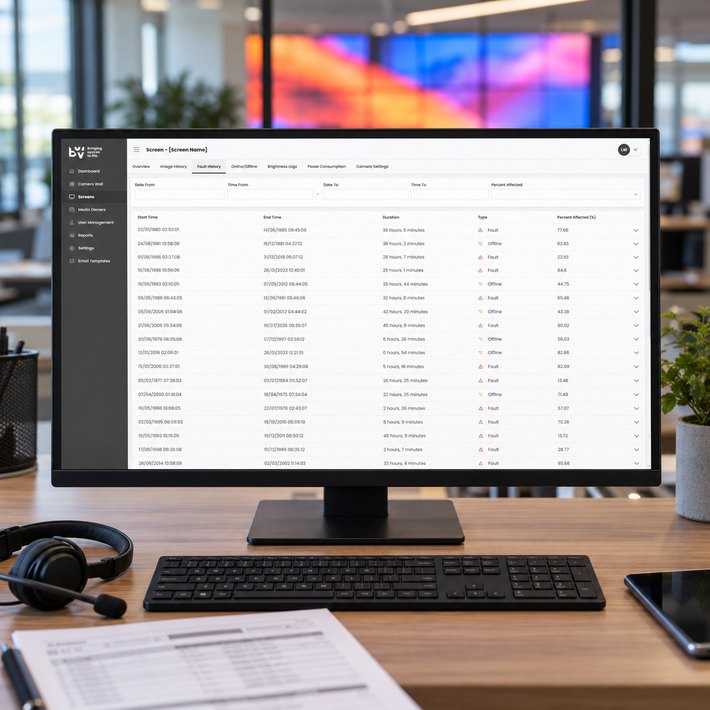
Big Screen Video fault history on a service desk monitor
Fault history

Every fault and outage, with how much of the screen it affected

When a screen faults or drops offline the platform records it, and when it recovers it closes the record. The result is a clean history of start time, end time, duration and the percentage of the screen affected, filterable by date and severity.

  • Fault and offline events with start, end and duration
  • Percentage of the screen affected on each event
  • Filter by date range and percent affected
  • Screen status reports on green time for media owners and tags
Technology stack

How it's built

The platform ingests telemetry and camera images from the screens, stores the history per screen and serves two front ends from one API: the Big Screen Video admin and a media owner portal with its own dashboard, screens, camera wall and reports. Settings cover API, FTP and data transfer integrations, screen and media owner tags, report configuration and email templates.

Single page application

Built in Vue.js as a single page application, for a fast experience without page reloads and the flexibility to evolve as the system grows.

API-focused backend

The backend is built in Laravel and MySQL with an API-first interface, so the web and mobile apps share the same endpoints.

Continuous integration

Automated testing and deployment let us test new builds and update production quickly, so we can release as often as required.

Managed hosting

Amazon's Elastic Container Service runs each service in its own container within a cluster that scales up and down as needed.

Managed hosting

Got a fleet of devices you can't see from the office?

We build platforms that collect what remote devices report and turn it into a dashboard, a history and alerts. Tell us what you need to watch.

Get in touch More of our work
Back to our work Next case study: Omega Coaters
Codium Logo
Codium Pty Ltd.
Ground Floor, 207 Greenhill Road
Eastwood, 5063
Adelaide, South Australia
  • 1300 887 103
  • sales@codium.com.au

Development

  • Software Development
  • Mobile Apps
  • Software Integration
  • Hardware Integration
  • Microsoft Access
  • Replace Spreadsheets

Managed Services

  • Software Takeover
  • Software Support (SLA)
  • Managed Hosting
  • Private AI Hosting
  • On-Premise AI

AI

  • AI for Business
  • AI Reporting

Strategy

  • Technology Partner
  • UI / UX Design
  • Due Diligence (M&A)
  • Why Projects Succeed
  • What Software Costs

Technologies

  • PHP · Laravel
  • JavaScript · Vue.js
  • AWS

Company

  • About Us
  • Industries
  • Our Work
  • Blog
  • Careers
  • Contact Us
  • Customer Feedback
  • Remote Support

© Codium Pty Ltd. All Rights Reserved.

  • Terms of Business
  • Privacy Policy
  • Quality Policy
  • Security Policy
  • Customer Experience Charter
Back Top
Codium
Services
All services Strategy
  • Technology Partner
  • UI / UX Design
  • Technology Due Diligence
  • Why Projects Succeed
  • What Software Costs
Development
  • Software Development
  • Mobile App Development
  • Software Integration
  • Hardware Integration
  • Microsoft Access Databases
  • Replace Spreadsheets
Managed services
  • Software Takeover
  • Software Support (SLA)
  • Managed Hosting
  • Private AI Hosting
  • On-Premise AI
AI
  • AI for Business
  • AI Reporting
Industries
All industries
  • Construction
  • Finance
  • Government
  • Health
  • Insurance
  • Manufacturing
  • Mining
  • Retail & E-commerce
  • Transport & Logistics
Our Work About Blog
Get in touch Call 1300 887 103