Codium Logo Codium Logo
  • Services
  • Industries
  • Our Work
  • About
  • Blog
Blog

Programming AVR - Parallel Port (LPT)

15 March 2009
Here is a quick and dirty tutorial for writing data and setting fuse bits on an AVR microcontroler using Ubuntu. All details in this post are related to the Atmega8-16PU, for other versions you should relate to the data sheets for the relevant specifications. First we need to get the necessary development tools:
# sudo  apt-get install gcc-avr avr-libc gdb-avr avrdude
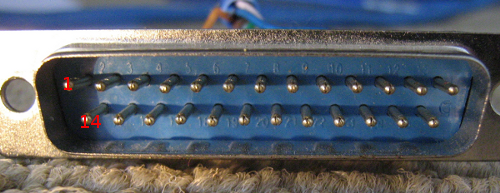
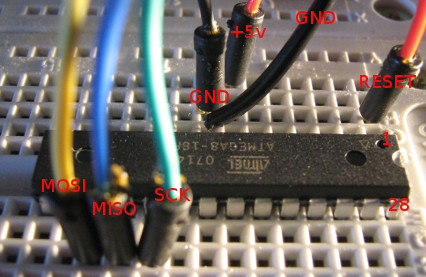
Now we need to create a cable to go between the LPT port on your PC and the AVR micro-controller:
DB25 Male AVR
Pin 1 SCK
Pin 2 MOSI
Pin 11 MISO
Pin 16 RESET
Pin 21 GND
*Warning: The data pins (1,2) should have a 1k resister in line, this is to stop you from killing either your LPT port, AVR, or both. It will work without just make sure you have it wired 100% correct. d9-f1 atmega8-1 Run the following to test the connection:
# sudo avrdude -p m8 -P /dev/parport0 -c dapa
You should receive back:
avrdude: AVR device initialized and ready to accept instructions
Reading | ################################################## | 100% 0.00s
avrdude: Device signature = 0x1e9307
avrdude: safemode: Fuses OK
avrdude done.  Thank you.
If you receive:
avrdude: AVR device not responding
avrdude: initialization failed, rc=-1
         Double check connections and try again, or use -F to override
         this check.
Then something is wrong and you should check all your connections. Now to Test out some code you can try this example:
/*
 * blink.c
 */

#include <avr/io.h> #include <util/delay.h> #define LED PD4

int main(void) { // define pd4 as output DDRD |= (1 << LED); while (1) { PORTD |= (1 << LED); // switch on _delay_ms(1000); PORTD &= ~(1 << LED); // switch off _delay_ms(1000); } return 0; }
Save as blink.c Now in the same directory save the following Makefile:
MCU=atmega8
AVRDUDEMCU=m8
CC=/usr/bin/avr-gcc
CFLAGS=-g -Os -Wall -mcall-prologues -mmcu=$(MCU)
OBJ2HEX=/usr/bin/avr-objcopy
AVRDUDE=/usr/bin/avrdude
TARGET=blink

program : $(TARGET).hex $(AVRDUDE) -p $(AVRDUDEMCU) -P /dev/parport0 -c dapa -U flash:w:$(TARGET).hex

%.obj : %.o $(CC) $(CFLAGS) $< -o $@

%.hex : %.obj $(OBJ2HEX) -R .eeprom -O ihex $< $@

clean : rm -f *.hex *.obj *.o
So now using the makefile we are going to create a .hex file of the c code above and write it onto our chip:
# sudo make
sucessful output:
/usr/bin/avr-gcc -g -Os -Wall -mcall-prologues -mmcu=atmega8   -c -o blink.o blink.c
/usr/bin/avr-gcc -g -Os -Wall -mcall-prologues -mmcu=atmega8 blink.o -o blink.obj
/usr/bin/avr-objcopy -R .eeprom -O ihex blink.obj blink.hex
/usr/bin/avrdude -p m8 -P /dev/parport0 -c dapa -U flash:w:blink.hex

avrdude: AVR device initialized and ready to accept instructions

Reading | ################################################## | 100% 0.00s avrdude: Device signature = 0x1e9307 avrdude: NOTE: FLASH memory has been specified, an erase cycle will be performed To disable this feature, specify the -D option. avrdude: erasing chip avrdude: reading input file "blink.hex" avrdude: input file blink.hex auto detected as Intel Hex avrdude: writing flash (138 bytes): Writing | ################################################## | 100% 0.05s avrdude: 138 bytes of flash written avrdude: verifying flash memory against blink.hex: avrdude: load data flash data from input file blink.hex: avrdude: input file blink.hex auto detected as Intel Hex avrdude: input file blink.hex contains 138 bytes avrdude: reading on-chip flash data: Reading | ################################################## | 100% 0.03s avrdude: verifying ... avrdude: 138 bytes of flash verified avrdude: safemode: Fuses OK avrdude done. Thank you.

rm blink.obj blink.o

Attach a LED to PD4 with a resister in line and the LED should light up and flash. Written by: Jason Smith
2009
Keep reading

More from the blog

Has your business outgrown Excel? Seven signs, and what to do about each one
15 Oct 2026

Has your business outgrown Excel? Seven signs, and what to do about each one

Spreadsheets fail slowly, so nobody notices the day they stop being a tool and start being the system. Here are the signs, the fix...

What has changed in custom software development over the last 12 months
2 Sep 2026

What has changed in custom software development over the last 12 months

Software development continues to evolve quickly, but the last 12 months have seen some particularly significant changes in the wa...

How do you know which asset is about to fail before it does?
30 Jul 2026

How do you know which asset is about to fail before it does?

The failure was there in the data for three inspections before the breakdown. Nobody could see it because the data was spread acro...

All articles

Want to talk about your own project?

Tell us what's slowing your business down. One of our digital strategists will talk it through with you.

Get in touch Call 1300 887 103
Codium Logo
Codium Pty Ltd.
Ground Floor, 207 Greenhill Road
Eastwood, 5063
Adelaide, South Australia
  • 1300 887 103
  • sales@codium.com.au

Development

  • Software Development
  • Mobile Apps
  • Software Integration
  • Hardware Integration
  • Microsoft Access
  • Replace Spreadsheets

Managed Services

  • Software Takeover
  • Software Support (SLA)
  • Managed Hosting
  • Private AI Hosting
  • On-Premise AI

AI

  • AI Consulting
  • AI Reporting

Strategy

  • Technology Partner
  • UI / UX Design
  • Due Diligence (M&A)
  • Why Projects Succeed
  • What Software Costs
  • What AI Consulting Costs

Technologies

  • PHP · Laravel
  • JavaScript · Vue.js
  • AWS

Company

  • About Us
  • Industries
  • Our Work
  • Blog
  • Careers
  • Contact Us
  • Customer Feedback
  • Remote Support

© Codium Pty Ltd. All Rights Reserved.

  • Terms of Business
  • Privacy Policy
  • Quality Policy
  • Security Policy
  • Customer Experience Charter
Back Top
Codium
Services
All services Strategy
  • Technology Partner
  • UI / UX Design
  • Technology Due Diligence
  • Why Projects Succeed
  • What Software Costs
  • What AI Consulting Costs
Development
  • Software Development
  • Mobile App Development
  • Software Integration
  • Hardware Integration
  • Microsoft Access Databases
  • Replace Spreadsheets
Managed services
  • Software Takeover
  • Software Support (SLA)
  • Managed Hosting
  • Private AI Hosting
  • On-Premise AI
AI
  • AI Consulting
  • AI Reporting
Industries
All industries
  • Construction
  • Finance
  • Government
  • Health
  • Insurance
  • Manufacturing
  • Mining
  • Retail & E-commerce
  • Transport & Logistics
Our Work About Blog
Get in touch Call 1300 887 103